Understanding Event Notifications
When a person withdraws consent or their personal data changes, other systems that hold or process that data may need to know about the change so they can take the appropriate action.
Event Notifications enables the WSO2 DPDP Accelerator to communicate these changes to connected systems automatically, without relying on manual notifications.
For example, when Priya (Data Principal) withdraws consent for marketing communications, CarePulse (Data Fiduciary) records the change and notifies CloudEngage (Data Processor), its email service provider. CloudEngage can then update Priya's marketing preferences to reflect her decision.
This guide explains how Event Notifications works, how to configure subscriptions, and how to ensure that events are delivered securely and reliably.
Meet the people in this example
We'll continue using CarePulse, the online healthcare service introduced in the Understanding Consent guide.
- Priya is a Data Principal who uses CarePulse and whose personal data is processed by the service.
- CarePulse is the Data Fiduciary. It determines why Priya's personal data is processed.
- CloudEngage is a Data Processor that sends marketing emails on CarePulse's behalf.
- MedExpress is a Data Processor that delivers orders for CarePulse.
- Anika is CarePulse's Administrator. She configures and manages Event Notifications through the Consent Portal.
How Event Notifications works
Event Notifications connects changes in the DPDP Accelerator with the systems that need to know about them.
The process follows three main steps:
- An event is produced. A relevant change occurs, such as Priya (Data Principal) withdrawing consent, or a connected application publishes a custom event.
- The event is matched to subscribers. Event Notifications identifies the subscriptions configured to receive events on the relevant topic and applies any configured filters.
- The event is delivered. The subscriber receives the event through a webhook or retrieves it through polling, depending on its subscription configuration.
The receiving system then processes the event and takes the appropriate action.

The diagram above illustrates the consent lifecycle, event production, subscription matching, and event delivery, including the alternative paths for publishing custom events and retrieving events through polling.
Four concepts to understand
Event Notifications uses four core concepts to connect changes with the systems that need to know about them.
- Topic: A category of change that subscribers can listen for, such as
consent.revoke. The accelerator provides standard topics for consent and account changes, and CarePulse (Data Fiduciary) can define custom topics for its own events. - Subscription: A Data Processor's registration to receive events for one or more topics. A subscription specifies how events should be delivered, either through a webhook endpoint or by allowing the processor to retrieve events through polling. It can also include filters, such as consent-purpose restrictions.
- Event: A record of a specific change, such as Priya (Data Principal) withdrawing consent for marketing communications. An event is associated with a topic and can be made available to systems subscribed to that topic.
- Delivery: The process of making an event available to a particular subscriber. Each subscriber's delivery is tracked separately, allowing delivery outcomes to be monitored independently when an event is sent to multiple subscribers.
Understanding these concepts makes it easier to follow how events are produced, matched to subscriptions, and delivered.
How events are produced
Events can originate from different parts of the system.
- Consent lifecycle events: WSO2 Identity Server generates events when relevant consent or account changes occur. For example, when Priya (Data Principal) withdraws consent, the accelerator can publish a
consent.revokeevent. - Custom events: A connected application, such as CarePulse (Data Fiduciary), can publish events to custom topics through the Event Notifications API. These events can represent business-specific changes, such as updates to delivery preferences.
This allows the accelerator to communicate changes arising from its own lifecycle operations while also supporting events originating from connected applications.
How subscriptions work
Before events can be delivered, the Data Fiduciary's administrator configures subscriptions for the Data Processors that need to receive notifications.
For example, CarePulse (Data Fiduciary) may need CloudEngage (Data Processor) to receive consent revocation events related to marketing communications, while MedExpress (Data Processor) may need to retrieve delivery preference updates.
To configure a webhook subscription, the administrator follows these steps:
- Collect webhook details. Obtain the Data Processor's webhook URL and any other required configuration details.
- Configure the subscription. Through the Consent Portal, select the event topics the Data Processor needs to receive, such as
consent.revoke, and configure the webhook endpoint. - Share the secret. Securely share the required subscription secret with the Data Processor so it can verify the subscription signature associated with incoming notifications.
For example, CarePulse collects CloudEngage's webhook URL. Anika (Data Fiduciary Administrator) creates a subscription for consent.revoke events and securely shares the required secret with CloudEngage.
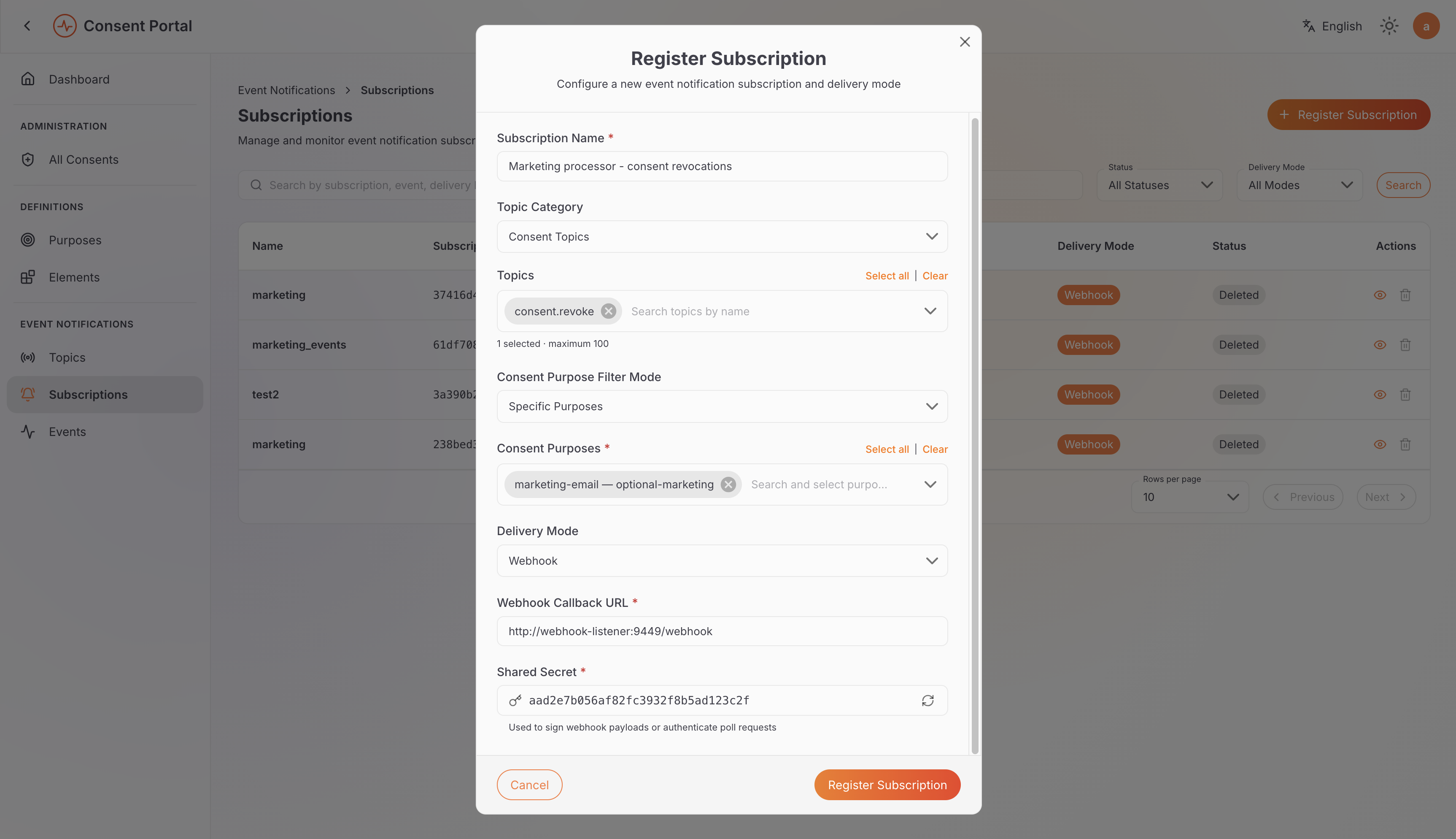
Anika's view (Data Fiduciary Administrator): registering a webhook subscription for consent revocation events.
The Data Fiduciary is responsible for ensuring that its Data Processors are appropriately configured and have the necessary contractual obligations to act on relevant notifications. The administrator manages the technical setup, including subscriptions, webhook settings, and credentials.
How events are delivered
The accelerator supports two delivery methods.
- Webhooks: Event Notifications pushes events to the subscriber's configured endpoint. For example, CloudEngage (Data Processor) can receive a
consent.revokeevent and update Priya (Data Principal)'s marketing preferences. To receive webhook notifications, the Data Processor must run a listener service that accepts incoming requests from the accelerator. - Polling: The subscriber periodically requests available events from the accelerator. For example, MedExpress (Data Processor) can retrieve relevant updates when polling for events.
The expected request and response format is defined in webhook-listener.openapi.yaml. You can use the sample implementations in Node.js and Python as starting points for your own listener.
The delivery method depends on the subscription configuration.
A successful delivery confirms receipt, not completion. Data Processors can also report when they've finished handling an event through event completion reporting, which we'll cover later in this guide.
Putting it together
Suppose Priya (Data Principal) withdraws her consent for marketing communications.
- Priya withdraws consent. She withdraws her consent through the Consent Portal, and CarePulse (Data Fiduciary) records her decision.
- The accelerator publishes an event. WSO2 Identity Server generates the relevant consent lifecycle event, and the accelerator publishes a
consent.revokeevent. - Event Notifications identifies the subscribers. The system determines which subscriptions are configured to receive the event's topic and applies any relevant filters.
- The event is delivered. CloudEngage (Data Processor) receives the event through its configured webhook or retrieves it through polling.
- CloudEngage updates its records. It processes the notification and updates Priya's marketing preferences so that the withdrawn consent is respected.
This approach helps CarePulse keep connected systems informed of important changes without requiring manual notification for every event.
Default topics
The accelerator automatically publishes events on five built-in topics covering the consent and account lifecycle.
| Topic | Published when |
|---|---|
consent.update | A consent's state changes, such as an approval or rejection. |
consent.revoke | A consent is revoked. |
consent.expire | A consent passes its expiry time. |
user.data.change | A user's profile data is modified. |
user.account.delete | A user account is deleted. |
Subscribe Data Processors to the topics relevant to their responsibilities. For example, CloudEngage (Data Processor) may need consent.revoke events to maintain marketing preferences, while another processor may need to respond to account deletion events.
Delivering events to relevant Data Processors
Not every Data Processor needs to receive every consent-related event. Purpose-based filtering helps limit notifications to the events relevant to a processor's responsibilities.
For example, Anika (Data Fiduciary Administrator) configures CloudEngage (Data Processor)'s subscription to receive consent revocation events associated with the marketing-email purpose.
This allows CloudEngage to receive relevant notifications without receiving events for unrelated consent purposes.
Subscriptions can be configured for all purposes, specific purposes, or all purposes except selected ones. Account events are not associated with consent purposes, so purpose-based filtering does not apply to them.
Try it: Subscribe to consent revocation events
Publishing custom events and retrieving them through polling
Not all events originate from consent lifecycle operations. Connected applications can also publish custom events to communicate business-specific changes.
Consider MedExpress (Data Processor), which runs behind a firewall that blocks incoming webhook calls. Its subscription uses polling instead, allowing MedExpress to retrieve events without requiring the accelerator to initiate connections to its endpoint.
When a customer updates their delivery preferences, CarePulse (Data Fiduciary)'s order system publishes a custom event on a topic that Anika (Data Fiduciary Administrator) created: delivery.preferences.update.
MedExpress periodically requests available events from the accelerator, processes the events it receives, and acknowledges each one so that it is not delivered again.
Custom events follow the same subscription and delivery process as built-in events. The main difference is that a connected application publishes them to a custom topic rather than relying on a built-in lifecycle event.
Try it: Publish your own event and poll for it
Securing webhook notifications
Before acting on a notification about Priya (Data Principal)'s consent, CloudEngage (Data Processor) needs to verify that the event is genuine and that the signed content has not been tampered with.
The accelerator supports two layers of signature verification.
- Event signature: WSO2 Identity Server signs the JWT event payload using its private key. CloudEngage can verify this signature using the corresponding public key published through the Identity Server's JWKS endpoint. This helps verify the event payload's authenticity and integrity.
- Subscription signature: Each delivery includes a signature generated using the shared subscription secret. CloudEngage verifies this signature to check the delivery against the configured subscription.
These signatures serve different purposes: the event signature verifies the signed event payload, while the subscription signature verifies the delivery's association with the subscriber's subscription.
Signatures do not encrypt event contents. Use HTTPS to protect notifications in transit, and avoid including unnecessary personal data in event payloads. Where possible, use references such as a consent ID rather than including personal data directly.
Try it: Understand what the shared secret protects
Handling failed deliveries and unavailable endpoints
Webhook endpoints may become temporarily unavailable because of network issues, maintenance, or other failures. Event Notifications provides delivery tracking and retry mechanisms to help administrators identify and investigate these problems.
Suppose CloudEngage (Data Processor)'s server is unavailable when Priya (Data Principal) withdraws her consent.
- The delivery fails. The accelerator cannot successfully deliver the event to CloudEngage's webhook endpoint.
- The accelerator retries. Event Notifications retries the delivery according to the configured retry policy.
- The delivery is marked Failed if retries are exhausted. If the delivery continues to fail, Anika (Data Fiduciary Administrator) can inspect the event and its delivery history under Event Notifications → Events.
- The administrator investigates. After addressing the underlying issue, Anika can retry the delivery when appropriate.
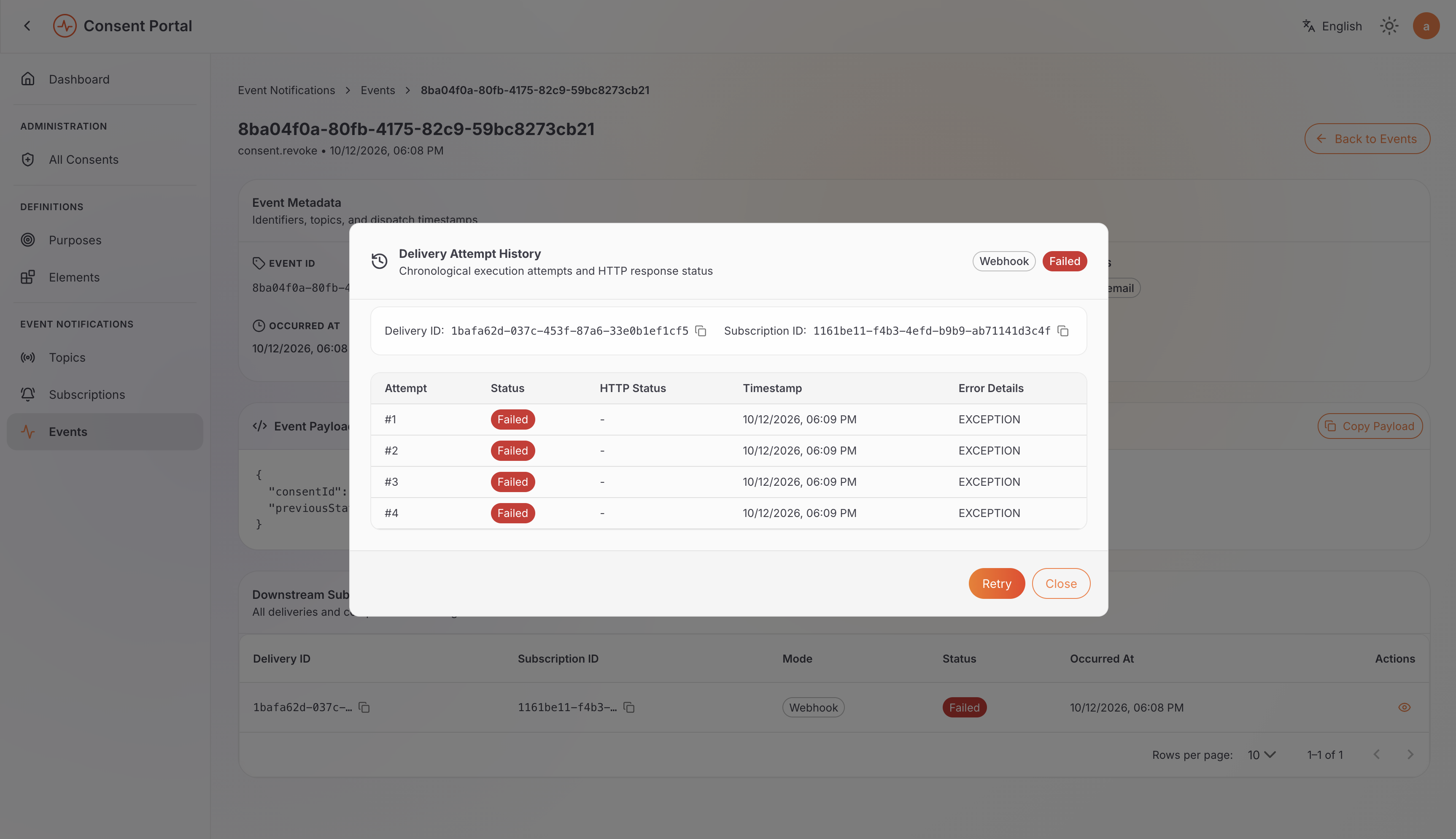
Anika's view (Data Fiduciary Administrator): a delivery that exhausted all its retry attempts, now marked Failed with a Retry option.
A subscription can also be marked Stale if its webhook endpoint fails the verification check used to confirm that it is ready to receive events. This indicates a subscription or endpoint readiness issue that may need investigation.
Try it: Confirm that the processor was notified
For more details, see Inspect events and delivery history.
What happens after an event is delivered?
Receiving a notification doesn't necessarily mean that the required action has been taken. A Data Processor still needs to process the event and act on the change.
To help track this, the DPDP Accelerator supports event completion reporting. This allows a Data Processor to report when it has successfully handled an event, recording that confirmation alongside the delivery.
For example, when Priya (Data Principal) withdraws her marketing consent, CloudEngage (Data Processor) receives a notification and updates her marketing preferences.
For webhook deliveries, there are two important things to understand:
- Delivered: CloudEngage's server confirms that it received the notification by returning a successful
2xxHTTP response. This doesn't mean CloudEngage has finished processing the event.
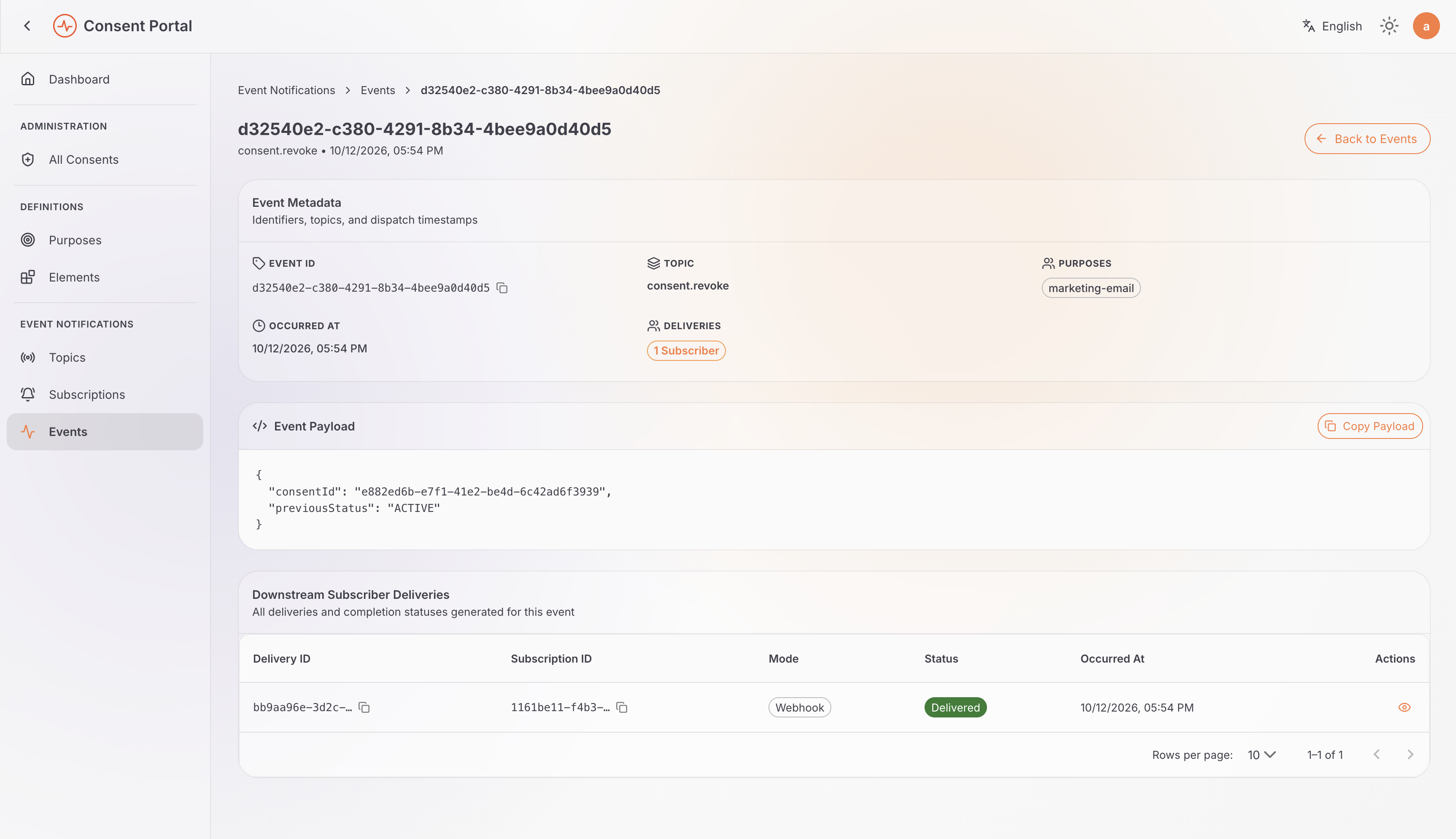
Anika's view (Data Fiduciary Administrator): the event detail page, with the delivery to CloudEngage (Data Processor)'s subscription shown as Delivered.
- Completion evidence: After updating Priya's marketing preferences, CloudEngage can submit a signed completion report. This doesn't change the delivery's status away from Delivered — instead, the completion is recorded alongside it as evidence that the required action was carried out.
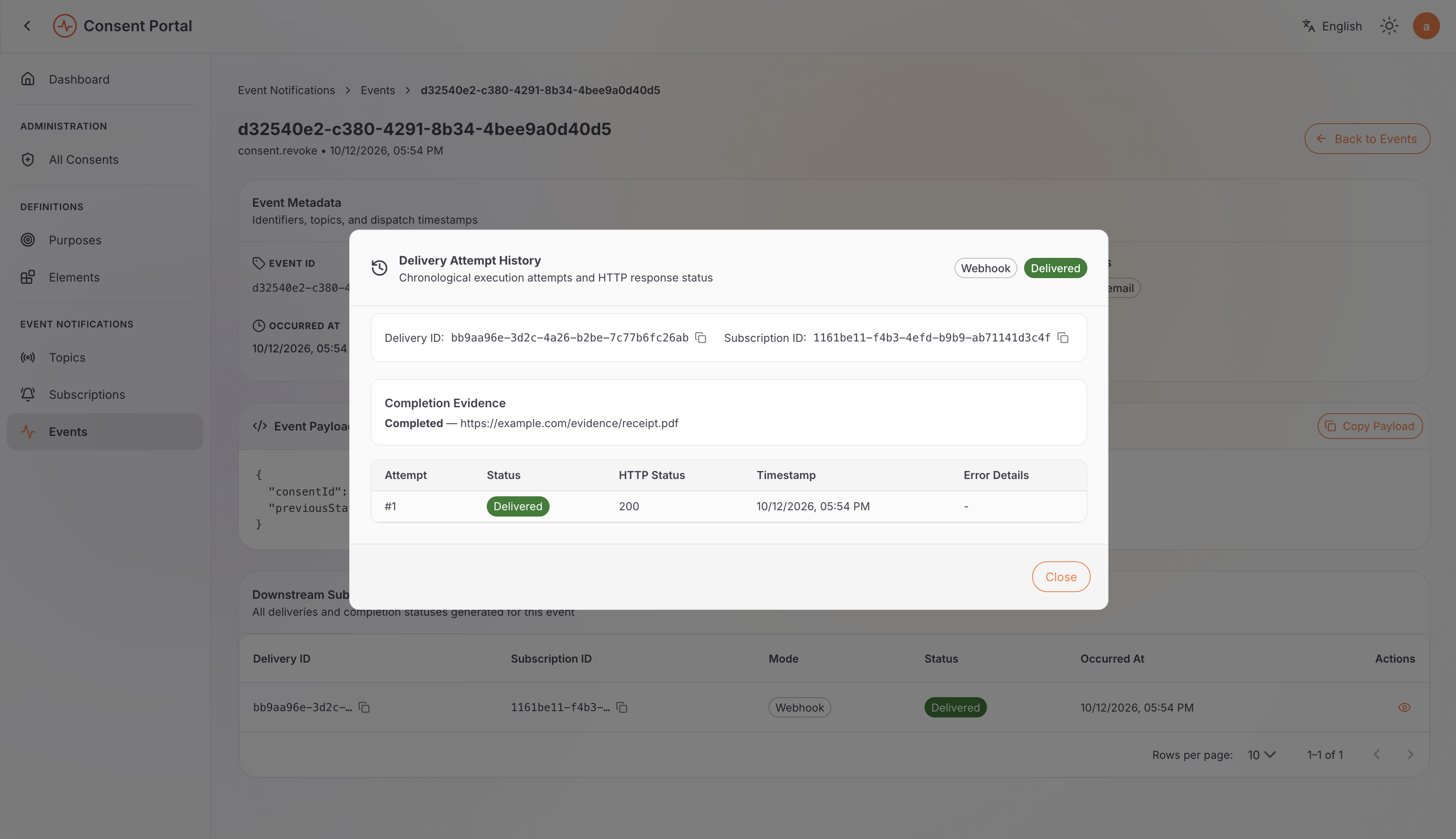
Anika's view (Data Fiduciary Administrator): the same delivery after CloudEngage (Data Processor) submits its completion report, now showing Completion Evidence alongside the Delivered status.
Completion can only be reported once a delivery has already reached Delivered, and only once per delivery. The completion report must also be signed using the subscription's shared secret so the accelerator can verify that it came from CloudEngage.
For details on how to submit a completion report, see Submit webhook delivery completion in the Event Notification Guide, or the POST /deliveries/{deliveryId}/completion operation in the DPDP Event Notification API specification.
In short: Delivered means the notification was received. Completion evidence means the Data Processor has additionally reported that it successfully handled the event.
By combining subscriptions, event delivery, signature verification, and delivery tracking, the DPDP Accelerator helps organizations communicate important changes to connected systems and monitor the outcome of those notifications.
Next Steps
- Try Out → Event Notifications: run these flows yourself, step by step.
- Try Out → Consent: give, review, and revoke a consent to see the events it triggers.