Understanding Complaints
Even when an organization has systems in place to manage consent, things can still go wrong. A consent withdrawal might not be reflected in a connected system, a person might continue receiving unwanted communications, or someone might have concerns about how their personal data is being used.
When this happens, people need a clear way to raise their concerns, understand what is being done about them, and track the outcome.
The WSO2 DPDP Accelerator provides a grievance handling system that connects Data Principals with grievance officers. It supports complaint submission, communication, investigation, and resolution while maintaining a record of complaint activity.
This guide uses a practical example to explain how complaints are handled and how Data Principals and grievance officers participate in the process.
Meet the people in this example
We'll continue using CarePulse, the online healthcare service introduced in the Understanding Consent guide.
- Priya is a Data Principal whose personal data is processed by CarePulse. She uses the Consent Portal to manage her consent and raise complaints when she has concerns.
- Ravi is CarePulse's Grievance Officer. He reviews complaints, investigates issues, communicates with complainants, and coordinates the actions needed to resolve them.
A real-world scenario: When a consent withdrawal isn't respected
The situation
Priya previously withdrew her consent for optional marketing communications through the Consent Portal. CarePulse recorded the withdrawal and notified its external email provider, CloudEngage, so that her marketing preferences could be updated.
However, CloudEngage received the notification but failed to update Priya's preferences. A few days later, she receives another marketing email.
She raises a concern:
I already opted out of marketing emails, but I'm still receiving them.
Let's follow how CarePulse can investigate and handle her complaint.
1. Submit a complaint
Priya signs in to the Consent Portal and opens My Complaints.
She then:
- Selects + Submit a complaint.
- Chooses Consent Withdrawal Issue and describes what happened.
- Attaches a screenshot of the unwanted email as supporting evidence.
- Submits the complaint.
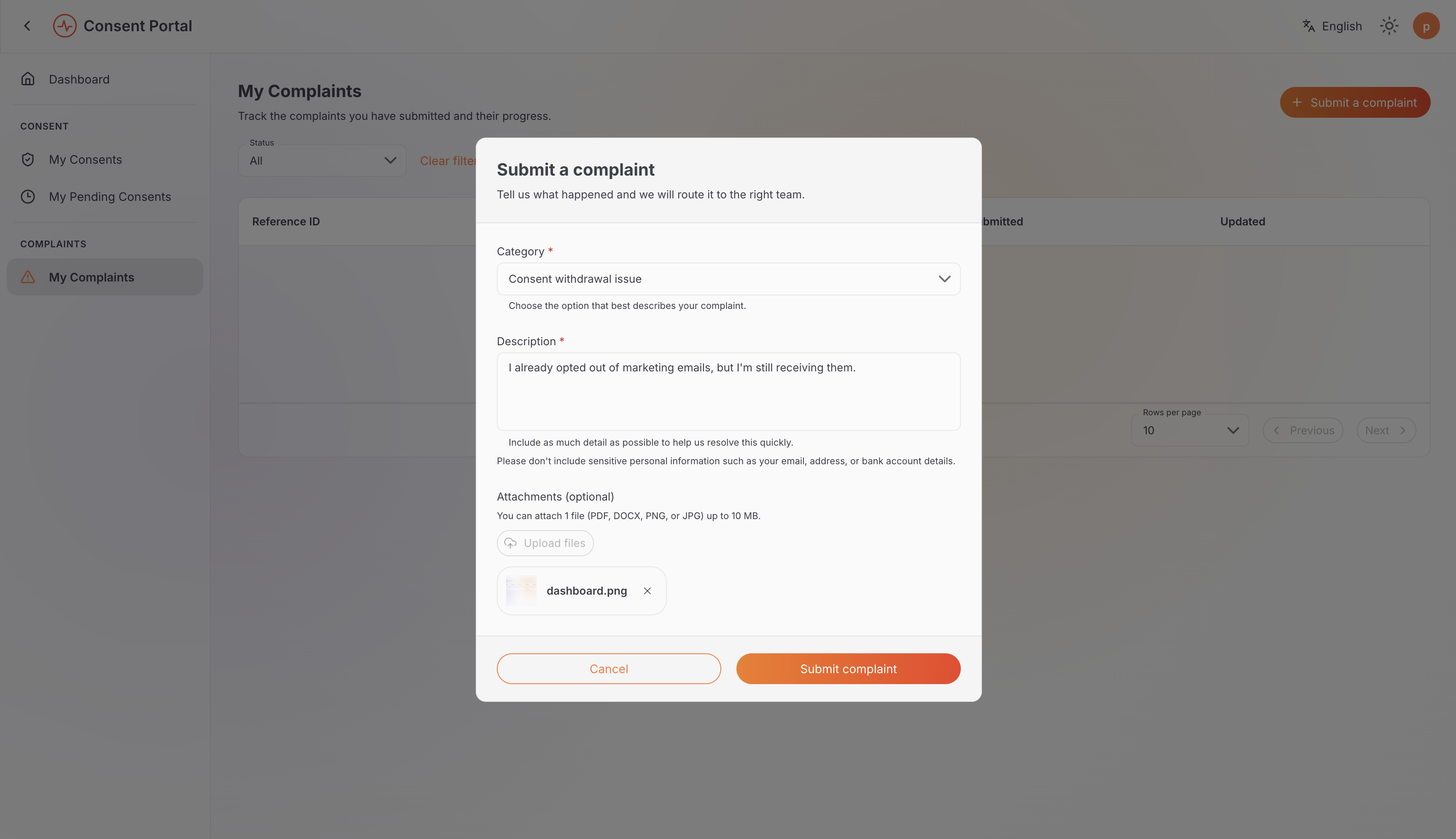
Priya's view (Data Principal): submitting a complaint.
The portal creates a complaint record with a reference ID, such as CMP-2026-00001, allowing Priya and the grievance officer to identify and track the case.
Priya can return to My Complaints to follow its progress and view updates.
2. Investigate the complaint
Ravi opens Complaint Management and reviews Priya's complaint.
To understand what happened, he examines the relevant consent history and works with the appropriate technical team to investigate how the marketing preferences are updated in CloudEngage.
The investigation reveals that:
- Consent history: Priya's consent withdrawal was recorded successfully by CarePulse.
- Marketing preferences: CloudEngage received the notification but did not update Priya's marketing preferences.
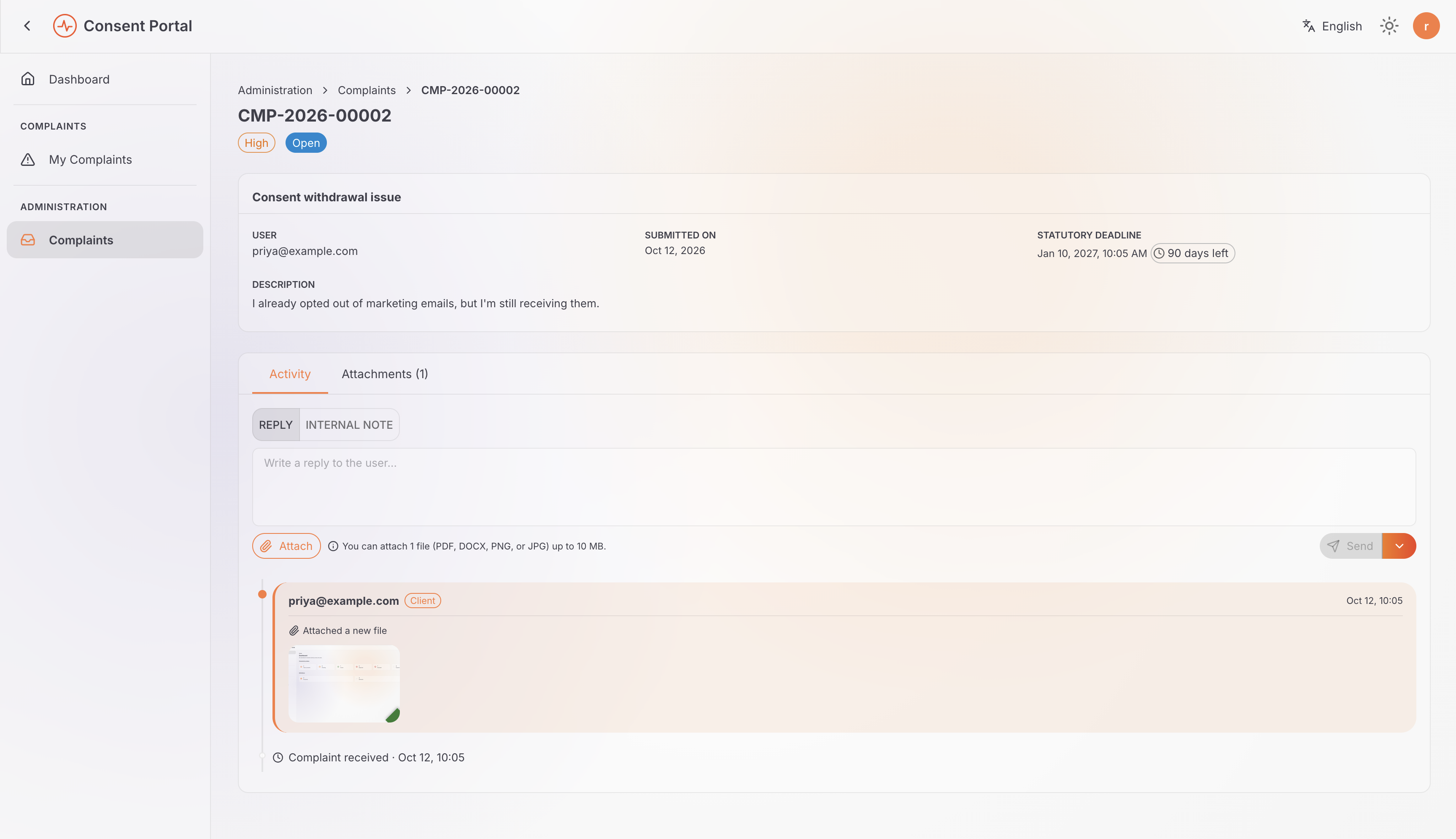
Ravi's view (DPO): reviewing Priya's complaint in Complaint Management.
These findings help Ravi establish that Priya's withdrawal was recorded correctly, but the external email provider continued using outdated preferences.
With the cause identified, Ravi can coordinate the corrective actions needed to prevent further unwanted marketing emails.
3. Communicate with the complainant
Resolving a complaint often involves technical investigation, but the person who raised it still needs clear updates. The accelerator distinguishes between messages shared with the complainant and internal investigation notes.
Public messages
Ravi sends Priya an update through the complaint record:
Hello Priya, we have confirmed that your consent was withdrawn successfully. We found that our email provider did not update your marketing preferences as expected. We are working with the provider to correct this.
Priya can view this message in her complaint timeline.
Internal notes
Ravi can also record investigation details for authorized officers, such as:
CloudEngage received the consent withdrawal notification but did not update the contact's marketing preferences. Coordinate with the vendor operations team to correct the preferences and verify that the contact is removed from active marketing campaigns.
These notes help document technical findings and follow-up actions without exposing internal investigation details to the complainant.
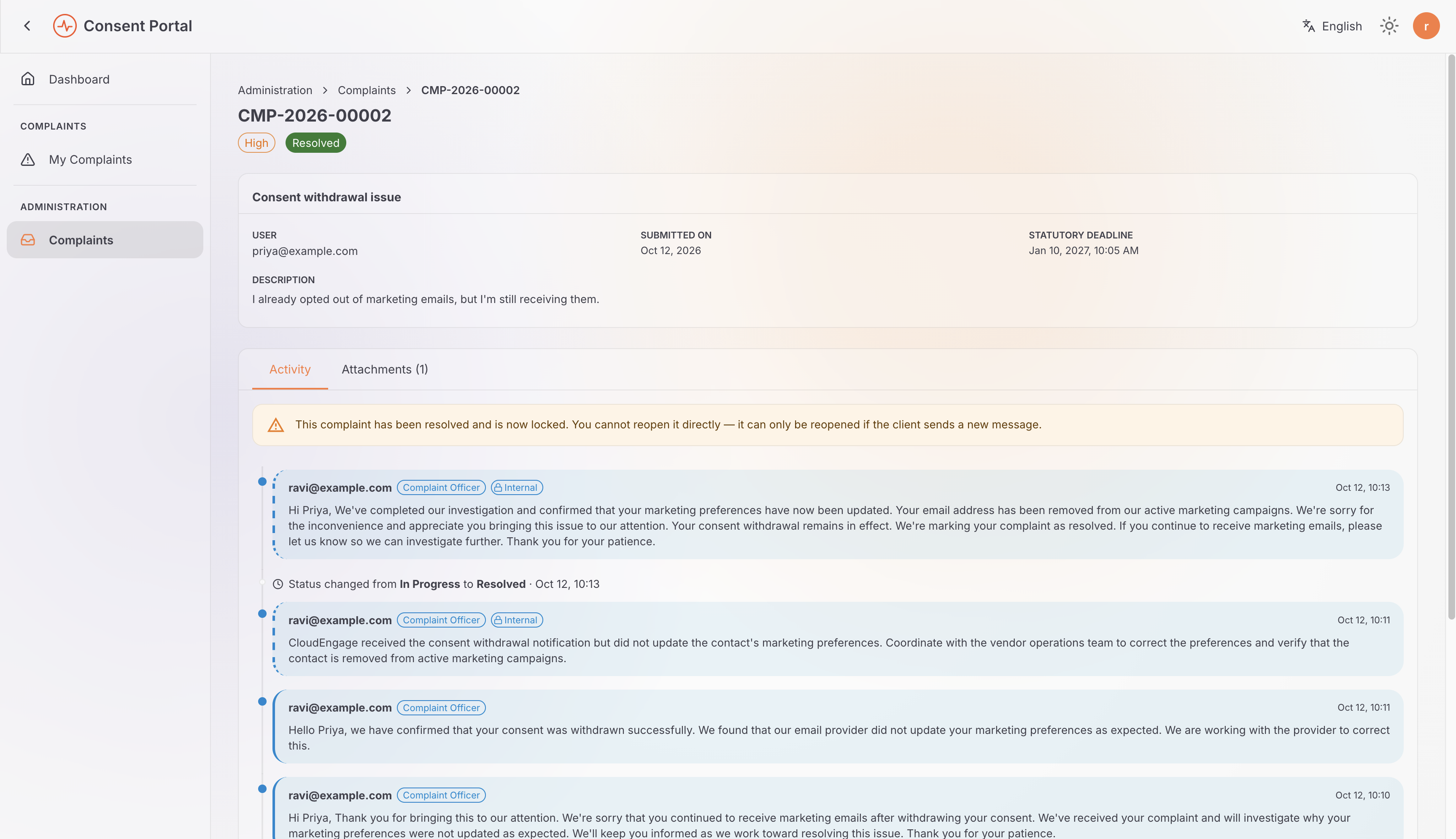
Ravi's view (DPO): public replies and internal notes together on the same complaint.
4. Resolve the complaint
Once CloudEngage confirms that Priya's marketing preferences have been corrected, Ravi updates the complaint's status to RESOLVED and records an explanation of the outcome.
Priya can review the response and the complaint's recorded activity through the Consent Portal.
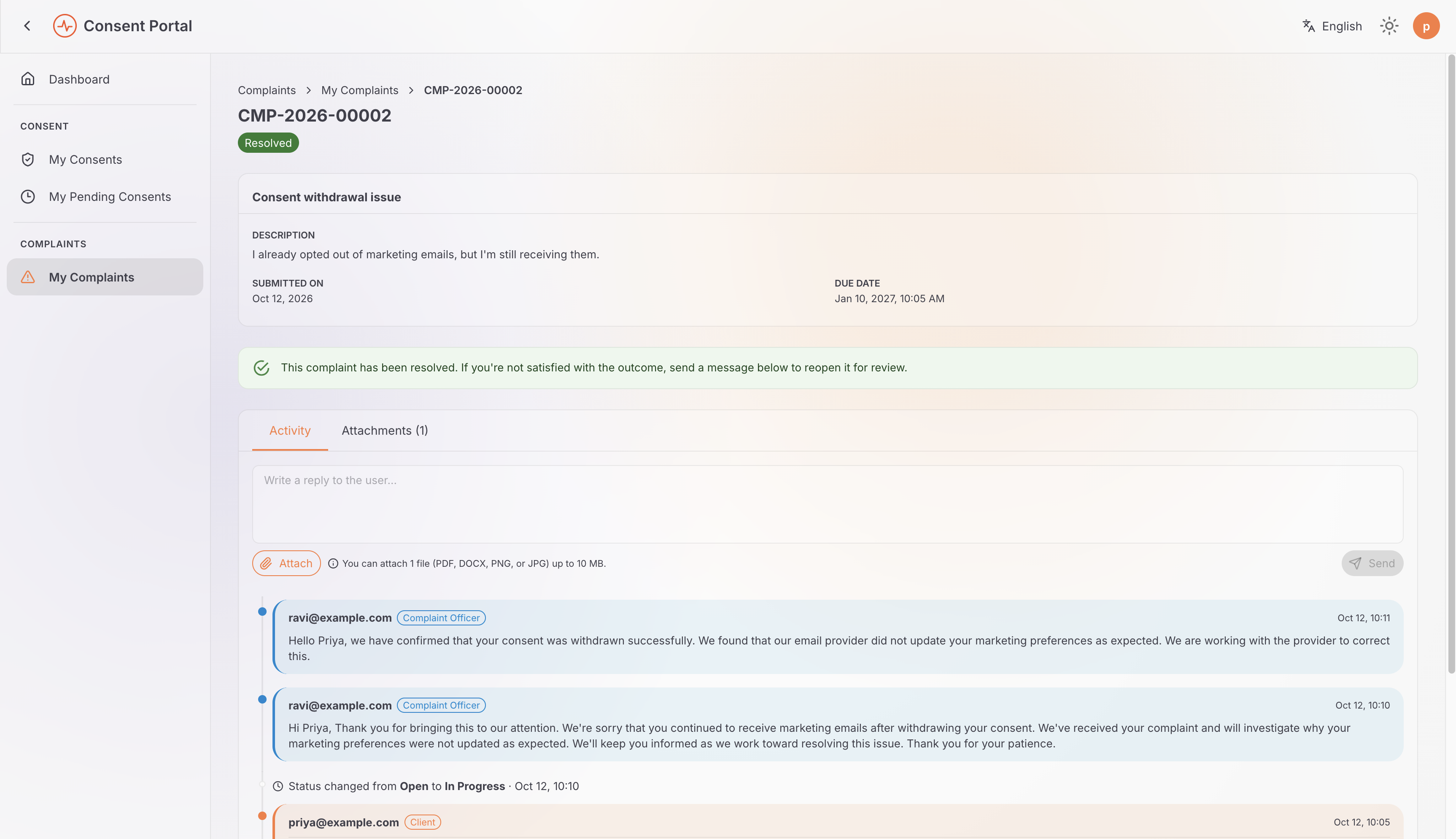
Priya's view (Data Principal): the resolved complaint, with only the public replies visible.
The complaint history provides a record of the investigation, communications, supporting evidence, and status changes. This helps CarePulse understand how the issue was handled and supports internal reviews and compliance activities.
Understanding complaint status
A complaint moves through a defined set of statuses as it progresses from submission to resolution.
| Status | Meaning |
|---|---|
OPEN | The complaint has been submitted and is awaiting review. |
IN_PROGRESS | A grievance officer is investigating the complaint. |
WAITING_ON_CLIENT | The officer needs additional information from the complainant before continuing. |
AWAITING_INTERNAL_REVIEW | The complainant has responded, and the officer needs to review the response before proceeding. |
RESOLVED | The complaint has been resolved and closed. |
How status transitions work
Complaints follow defined status transitions rather than allowing arbitrary changes. For example, a complaint cannot move directly from OPEN to RESOLVED; it must first progress through IN_PROGRESS.
A resolved complaint can also be reopened if further review is needed. It can transition to AWAITING_INTERNAL_REVIEW, allowing the grievance officer to review the new information and determine the next steps.
For example, if Priya continues receiving marketing emails after her complaint is resolved, she can ask CarePulse to review the case again.
Role separation for complaints
The accelerator separates complaint access according to each user's role. Data Principals manage their own complaints, while grievance officers handle complaints across the organization.
| Role | Responsibility and access |
|---|---|
dpdp-consent-user | Can submit, view, and respond to their own complaints through the self-service portal, subject to the granted permissions. |
dpdp-consent-dpo | Can review and manage tenant-wide complaints, send public replies, add internal notes, and update complaint statuses, subject to the granted permissions. |
The roles also use different API scopes and endpoint paths. Data Principals access their own complaints through self-service endpoints, while grievance officers use tenant-wide complaint management endpoints.
For details about roles, permissions, and API access, see Managing Access.
Next Steps
- Hands-on Walkthrough: Follow the step-by-step Try Out guide in Try Out: Complaints.
- Keep connected systems informed: See Event Notifications to learn how systems like CloudEngage find out about changes such as a consent withdrawal.